

Table of Contents
- How Smart Posture Trainers Work
- Benefits of Smart Posture Trainers vs. Manual Braces
- Key Features to Look for as a Beginner
- How Long to Wear a Posture Corrector Each Day
- Posture Training Exercises for Beginners
- Building Long-Term Habits and Fixing Beginner Frustrations
- Pairing Your Smart Posture Trainer with an Ergonomic Setup
- Conclusion
Last Updated: August 24, 2026
How Smart Posture Trainers Work
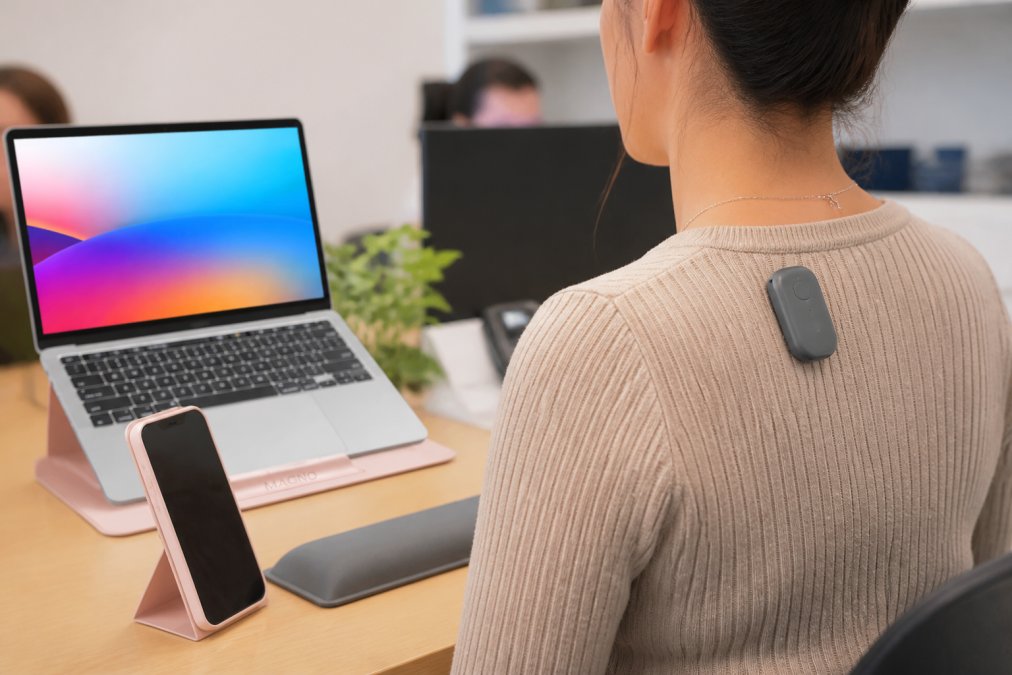
A smart posture trainer is a small wearable device that monitors spinal alignment in real time and delivers feedback when it detects slouching. This guide from MyStuff breaks down everything beginners need to know before buying one, from sensor technology to long-term habit formation.
Most people assume posture problems are a willpower issue. The real problem is that you can't feel yourself slouching until the damage is done. A smart posture trainer solves this with continuous biofeedback, turning an invisible habit into something measurable and correctable.
According to National Institute of Neurological Disorders and Stroke guidance on back pain, poor posture is a contributing factor to chronic neck and back strain, conditions that affect a significant portion of office workers.
Sensor Technology and Biofeedback
Smart posture trainers use accelerometers and gyroscopes to track the angle and orientation of your thoracic spine. When the device detects your posture has deviated past a calibrated threshold, it triggers a response. Better devices use multi-axis sensors that accurately map thoracic spine deviation in three dimensions, while cheaper devices use single-axis sensors that can't distinguish between leaning forward and sideways.
Biofeedback is the process of using real-time data about your body's position to consciously correct it. The companion application logs your posture score throughout the day, giving you a data-driven picture of when and how often you slouch.
Haptic Alerts vs. Passive Reminders
Haptic feedback, a vibration alert delivered directly to your body, is the most effective short-term correction tool. When you feel the buzz, you straighten up. It's immediate and unobtrusive enough to use in meetings or on calls.
Passive reminders, such as push notifications from a companion app, are less effective for real-time correction. Most beginners benefit from starting with haptic alerts set to a low sensitivity, then gradually reducing the frequency as muscle memory develops. Start with the longest alert delay your device allows and tighten it as your baseline posture improves.
Benefits of Smart Posture Trainers vs. Manual Braces
Manual posture braces hold your shoulders back mechanically, but this passive solution can weaken the muscles you're trying to train. Smart posture trainers take the opposite approach: they don't restrict movement. Instead, they build postural awareness by training your nervous system to recognize and self-correct bad alignment.
A companion application tracks your posture patterns across days and weeks, showing exactly which hours of the day your posture deteriorates. That kind of activity tracking is impossible with a brace.
| Feature | Smart Posture Trainer | Manual Brace |
|---|---|---|
| Real-time feedback | Yes, haptic or app alerts | No |
| Muscle strengthening | Yes, active correction | No, passive support |
| Activity tracking | Yes, via companion app | No |
| Wearability | Lightweight, unobtrusive | Bulky, visible under clothing |
| Long-term habit formation | Designed for it | Not applicable |
| Adjustable sensitivity | Yes, calibration options | No |
For lasting postural improvement rather than temporary support, a smart posture trainer is the more effective tool.
Key Features to Look for as a Beginner
Most beginners over-focus on price and under-focus on the features that determine whether they'll actually use the device after week two.
Comfort, Adhesion, and Wearability
A posture trainer you don't wear is useless. Look for devices that weigh under 20 grams, use hypoallergenic adhesive or a clip-on attachment, and sit flat enough to wear under a shirt without creating a visible bump.
Clip-on designs that attach to a bra strap or collar are often more practical for long-term wear than disposable adhesive strips, which require ongoing purchases and can irritate skin. Battery longevity matters too, look for a minimum of five to seven days on a single charge.
App Integration, Calibration, and Data Privacy
The companion application is where a smart posture trainer earns its price. A good app should offer initial calibration that sets your personal "good posture" baseline, daily and weekly posture scores for trend tracking, adjustable sensitivity, and reliable Bluetooth synchronization.
Calibration deserves special attention. A device that isn't calibrated to your specific body will generate false alerts or miss real slouching. Proper calibration typically takes two to three minutes.
Data privacy is a legitimate concern. These devices collect continuous biometric data about your physical behavior. Check whether the companion app's privacy policy specifies that data is stored locally on your device or transmitted to cloud servers. As Federal Trade Commission guidance on wearable device data privacy notes, consumers should review privacy disclosures carefully before connecting health-adjacent wearables to cloud accounts.
How Long to Wear a Posture Corrector Each Day
The ideal wear time for a smart posture trainer is 30 to 60 minutes per day for the first two weeks, increasing gradually to two to four hours as your back muscles adapt. Many beginners make the mistake of wearing the device all day immediately, which leads to muscle fatigue and abandonment.
A practical progression looks like this:
- Week 1-2: 30 to 60 minutes daily, during a predictable activity like morning desk work
- Week 3-4: 90 minutes to two hours, adding a second session if comfortable
- Month 2 onward: Two to four hours, with the goal of reducing reliance on the device as muscle memory develops
The goal is to eventually need the device less, not more. If you're still getting alerts at the same frequency after six weeks, your exercise routine and ergonomic setup need attention.
Posture Training Exercises for Beginners
A smart posture trainer without a supporting exercise routine is like a fitness tracker without actual workouts. The device identifies the problem; these exercises fix it.
Posture training exercises for beginners should target the deep neck flexors, thoracic spine extensors, and scapular retractors. According to American Physical Therapy Association resources on posture and spinal health, the most effective beginner exercises include:
- Chin tucks: Pull your chin straight back to elongate the back of the neck. Hold for five seconds, repeat ten times.
- Thoracic extensions over a foam roller: Lie over a foam roller positioned at mid-back and gently extend to mobilize the thoracic spine.
- Scapular squeezes: Pull your shoulder blades together and hold for five seconds.
- Wall angels: Stand with your back flat against a wall and slowly raise and lower your arms in a snow-angel motion.
Ten minutes of these exercises daily produces measurable improvement in postural awareness within four to six weeks.
Building Long-Term Habits and Fixing Beginner Frustrations
Most people stop using smart posture trainers within three weeks, not because the technology fails, but because the habit-building strategy fails.
Habit Formation Psychology Behind Posture Correction
Habit formation research shows that new behaviors stick when they're attached to existing routines, not when they require willpower. Pair your smart posture trainer with a specific existing habit: your morning coffee, your first video call, or the first hour after lunch.
Reward matters too. The companion application's posture score functions as an immediate reward signal. Set a target posture score for the week, not just a wear time goal. The real difference between people who build lasting postural awareness and those who don't comes down to using environmental cues instead of waiting to feel motivated.
Troubleshooting Common Beginner Problems
"The device keeps vibrating even when I think I'm sitting straight." This is almost always a calibration issue. Recalibrate while sitting in your best posture, not a neutral or comfortable position.
"I forget to put it on." Place the device on your keyboard the night before. Physical placement beats reminders every time.
"My skin is getting irritated from the adhesive." Switch to a clip-on attachment if your device supports it, or apply a thin fabric barrier between the adhesive and skin.
"I'm getting alerts constantly and it's distracting." Reduce the device sensitivity in the companion app. Two to four alerts per hour is a reasonable starting point.
Pairing Your Smart Posture Trainer with an Ergonomic Setup
A smart posture trainer corrects how you sit. An ergonomic setup determines what you're sitting into. Both matter, and neither works as well without the other.
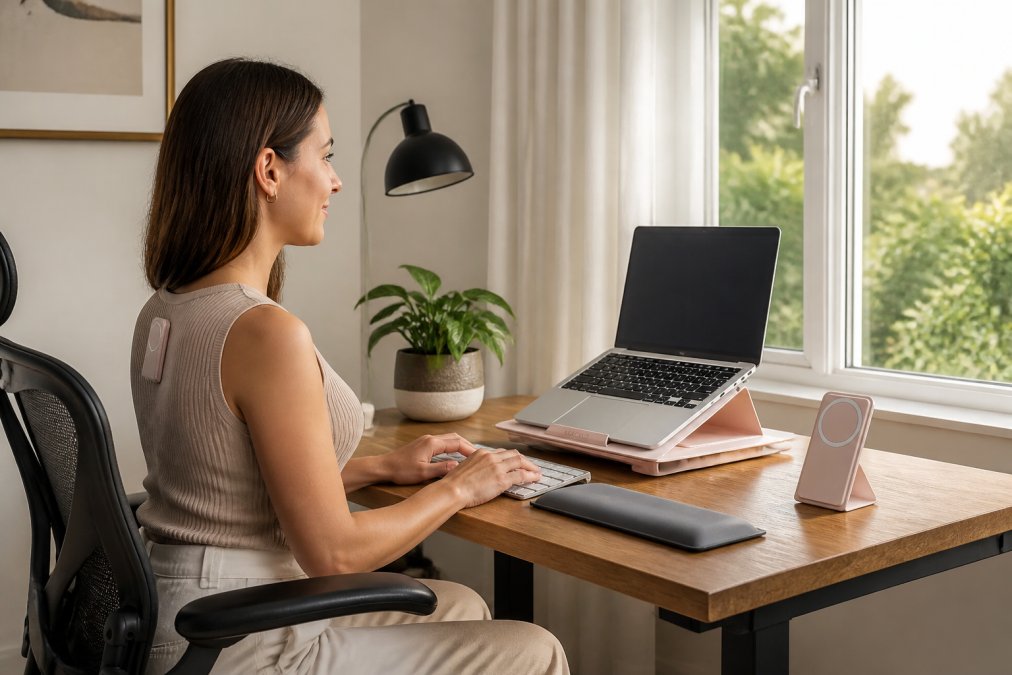
The most common ergonomic failure in home offices is laptop screen height. When your screen sits flat on a desk, you tilt your head down to view it, which places roughly 40 to 60 pounds of effective load on your cervical spine, according to Spine-health overview of forward head posture and cervical load. A smart posture trainer will alert you constantly in this setup because the problem is structural, not behavioral.
The fix is straightforward: raise your screen to eye level. The MyStuff Modulemaster Adjustable Laptop Stand does exactly this. At $48.66, it provides height-adjustable elevation that brings your laptop screen to a neutral viewing angle, reducing neck strain and dramatically reducing the number of posture alerts you'll receive. It's lightweight enough to pack for travel.

An ergonomic assessment of your setup should cover:
- Screen height: Top of screen at or slightly below eye level
- Chair height: Feet flat on the floor, knees at roughly 90 degrees
- Keyboard position: Elbows at 90 degrees, wrists neutral
- Monitor distance: Arm's length from your face
- Lighting: No glare on the screen
Pairing a properly calibrated smart posture trainer with a corrected ergonomic setup is the fastest path to eliminating neck strain. The device handles real-time correction; the setup removes the structural triggers that cause slouching. Together, they address the sedentary lifestyle problem at both the behavioral and environmental level.
Shop Smart Essentials at MyStuff to find ergonomic tools that complement your posture training routine, including the Modulemaster Laptop Stand with complimentary ground shipping on every order.
Frequently Asked Questions
Do smart posture trainers actually work for long-term alignment?
Smart posture trainers can improve spinal alignment over time, but only when used consistently. The device itself does not fix posture, the vibration alerts train postural awareness, which gradually builds muscle memory. Most users report noticeable improvement after several weeks of daily use combined with targeted exercises. Treating the wearable device as a habit-formation tool rather than a passive fix produces the best long-term results.
How long should you wear a smart posture trainer each day?
Most posture trainer guidelines recommend starting with 15 to 30 minutes per day for the first week, then gradually increasing to 1 to 2 hours as your muscles adapt. Wearing it too long too soon can cause muscle fatigue because your back is working harder than usual to hold the corrected position. Once good posture becomes habitual, typically after 4 to 8 weeks, daily wear time can be reduced as your body maintains alignment on its own.
What is the difference between a posture brace and a smart posture trainer?
A posture brace is a passive garment that physically holds your shoulders back, requiring no effort from your muscles. A smart posture trainer is a small wearable device that monitors spinal alignment using sensor technology and sends haptic feedback, a gentle vibration, when you slouch. Because smart trainers prompt you to self-correct rather than correcting for you, they build active muscle memory and postural awareness over time, which is more effective for lasting improvement.
Are smart posture trainers safe for beginners to use?
Yes, smart posture trainers are generally safe for healthy beginners. The main risk is overuse: wearing the device for too many hours before your back muscles have adapted can cause soreness. Start with short sessions and increase duration gradually. Anyone with a diagnosed spinal condition, chronic back pain, or recent injury should consult a physician or physical therapist before using any posture correction device to confirm it is appropriate for their situation.
Neck strain and poor spinal alignment are problems that compound quietly over months and years. A smart posture trainer is one of the most practical tools available for building the postural awareness that prevents long-term damage, but the device alone isn't enough. MyStuff's ergonomic solutions, including the Modulemaster Adjustable Laptop Stand, address the structural side of the equation. Get started with MyStuff and pair your posture trainer with a workspace that stops working against you.
This article was written using GrandRanker